
Introduction
To start with Exact Match Marketing Pixel, please follow the steps below to install your pixel.
If you need extra guidance after this instruction, please don't hesitate to reach out to our team through Exactmatch Marketing Support.
What is a pixel?
A pixel is a small piece of code embedded in a website or email that collects data about user interactions. When someone visits a page with a pixel, it "fires" and sends specific information back to the pixel’s server. This data includes actions like page views, clicks, and even time spent on the page.
Pixels enable businesses to gather actionable data on user behavior, allowing for improved targeting, efficient advertising, optimized content, and enhanced user experiences, ultimately leading to better results for the business.
Where to find the pixel?
Once you've set up your campaign, you can easily access your embed code to install the pixel on your website.
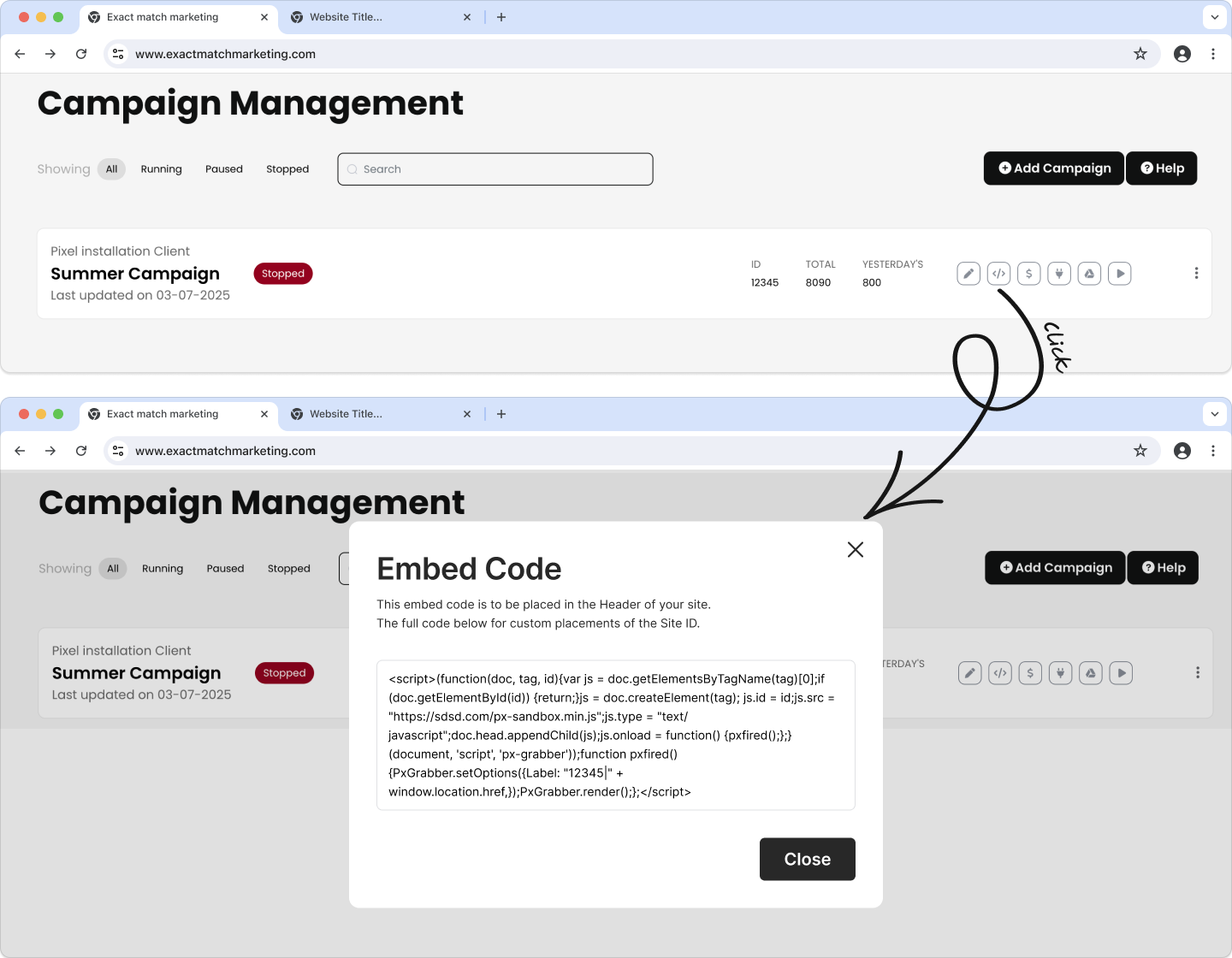
How to install the pixel?
How you'll deploy the Exact Match pixel depends on where you built your website.
Situation 1:
If you can directly access the web code, please paste your pixel Header of your site
Situation 2:
If you built your website using a web builder or hosting platform, such as Wix or WordPress, please extend the toggles below to view the guidelines specific to your platform.
- Go to Dashboard: Log in and access your site’s dashboard.
- Go to Settings: In the left menu, click Settings.
- Custom Code: Select Custom Code
- Paste Pixel Code: Insert your pixel in the text box.
- Choose Placement: Set it to the Header section.
- Publish Changes: Save, publish your site, and verify the pixel is active.
- Install Plugin: Go to Plugins > Add New, and search for Insert Headers and Footers.
- Activate Plugin: Install and activate the plugin.
- Insert Code: Go to Settings > Insert Headers and Footers.
- Paste Pixel Code: Add the pixel code in the Header section.
- Save Changes: Save the settings, and your pixel is now active on your site.
- Log in: Open your Squarespace account and select the site to edit.
- Site Settings: In the left menu, click Settings, then Advanced.
- Code Injection: Select Code Injection.
- Add Pixel Code: Paste the pixel code in the Header section.
- Save & Publish: Save the changes, publish your site, and check to ensure the pixel is live.
- Online Store: From your Shopify admin, go to Online Store > Themes.
- Edit Code: Under the Actions menu, select Edit Code.
- Theme.liquid: Open the theme.liquid file.
- Insert Pixel Code: Paste your pixel code in header
- Save: Save and from the dashboard check your connection.
- Project Settings: Open your project and go to Settings.
- Custom Code: Navigate to the Custom Code section.
- Paste Pixel Code: Insert the pixel code in the Footer Code area.
- Publish Site: Save and publish your site, then verify that the pixel is working.
- Open Editor: Access your site and click Edit Site.
- Settings: Go to Settings in the editor.
- Site History and Code Injection: Choose Site History & Tracking > Code Injection.
- Add Pixel Code: Paste the pixel code into the Header or Footer section as required.
- Save and Publish: Publish your changes and check the pixel’s functionality.
Google Tag Manager is a tool that lets you add and manage tracking tags on your website or app without needing to edit the code directly. It streamlines the process of updating tags for analytics, marketing, and other purposes, making it easier and faster to manage and track data.
- Login to your GTM.
- Make sure you select the right account / container, then click "Add Tag".
- Name your tag "EMM".
- Click "Tag Configuration", select "Custom HTML", copy the pixel code from Intentwave Dashboard, then paste it into the designated area.
- Click "Triggering" and select "All pages", then click "Save".
- You will automatically go back to the dashboard. In the top-right corner, click "Sumbit" to publish your changes to production.
- Login Go to the sites section
- In sites select your Project/Website
- Open settings
- Place the pixel code inside Head tracking code section